650 SnakeGame
650 : SnakeGame
- Author: stacu
- Description: Game of Snake
- GitHub repository
- Open in 3D viewer
- Open in Tiny Tapeout Explorer
- Open in VGA Playground
- Clock: 25175000 Hz
TT Snake Game
How it works
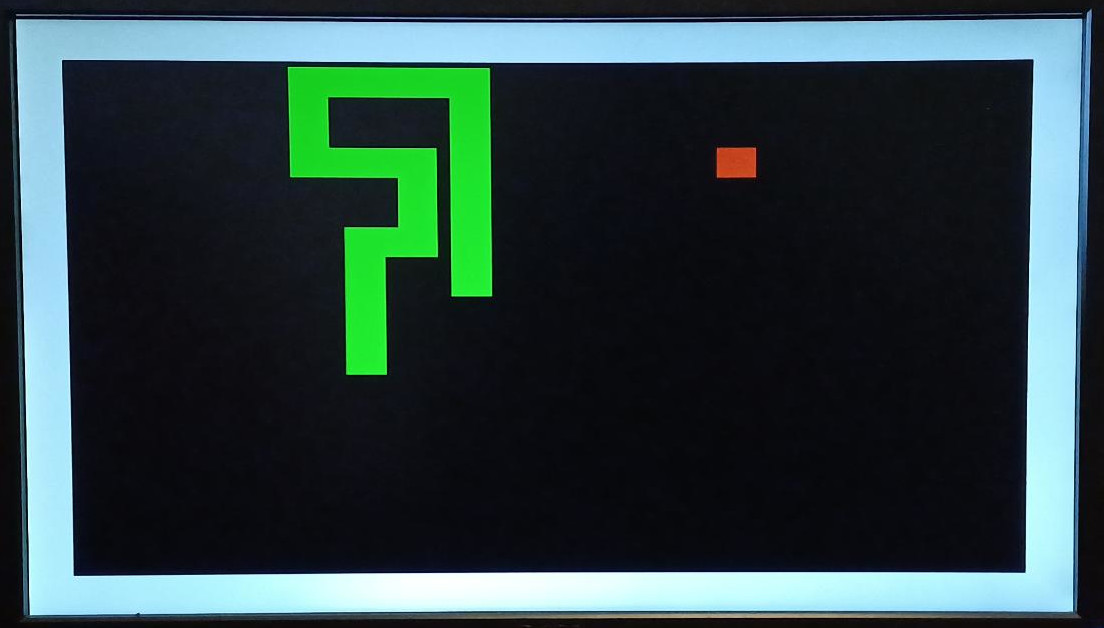
Snake is a simple video game where the player controls a snake. The goal is to eat food while preventing the snake from biting itself or moving into the walls. Every time the snake eats food it gets a bit longer, increasing the difficulty.
The game is won if the snake fills the entire area.
The current state of the game is displayed on a VGA monitor and the player can control the snake using four buttons.
How to test
The clock input frequency must be set to the VGA frequency of 25,175,000 Hz.
Connect the VGA PMOD to the output pins.
| function | uo_out | polarity |
|---|---|---|
| R1 | uo_out[0] | |
| G1 | uo_out[1] | |
| B1 | uo_out[2] | |
| VSync | uo_out[3] | 0 during image, 1 during pulse |
| R0 | uo_out[4] | |
| G0 | uo_out[5] | |
| B0 | uo_out[6] | |
| HSync | uo_out[7] | 0 during image, 1 during pulse |
Connect the control buttons to the input pins as follows.
| function | ui_in | optional? |
|---|---|---|
| up | ui_in[0] | no |
| down | ui_in[1] | no |
| left | ui_in[2] | no |
| right | ui_in[3] | no |
| pause | ui_in[4] | yes (if 0) |
| restart | ui_in[5] | yes (if 0) |
The game starts once the button of a valid input direction has been pressed.
The game speed can be changed by pressing up/down while asserting restart. It is linked to the VGA display refresh rate with a controllable factor (0-7), which slows down the game speed accordingly. Default is 7, which results in 4 updates per second.
Additionally, the game provides an audio output and exposes four signals about the game state that can be used to add external hardware, e.g. a scoreboard or timer.
| function | uio_out | info |
|---|---|---|
| failure | uio_out[0] | high until restart |
| success | uio_out[1] | high until restart |
| eat | uio_out[2] | > 100 cycles high & low |
| tick | uio_out[3] | > 100 cycles high & low |
| audio | uio_out[7] | pwm audio output |
External hardware
Playing the game requires the VGA PMOD, Audio PMOD (optional), four buttons for movement controls, and two optional buttons for pause and restart.
IO
| # | Input | Output | Bidirectional |
|---|---|---|---|
| 0 | up | vga r1 | failure |
| 1 | down | vga g1 | success |
| 2 | left | vga b1 | eat |
| 3 | right | vga vsync | tick |
| 4 | pause | vga r0 | |
| 5 | restart | vga g0 | |
| 6 | vga b0 | ||
| 7 | vga hsync | audio |