264 ihp_cmos51_prism
264 : ihp_cmos51_prism
- Author: Ken Pettit
- Description: A programmable FSM
- GitHub repository
- Open in 3D viewer
- Open in Tiny Tapeout Explorer
- Clock: 64000000 Hz
PRISM
Author: Ken Pettit
Peripheral index: 8
What it does
This is a Programmable Reconfigurable Indexed State Machine (PRISM) that executes a Verilog coded Mealy state machine loaded via a runtime loadable configuration bitstream generated by a custom branch of Yosys. PRISM includes it's own counter, shift register and compare sub-peripherals for controlling input/output data as well as timing operation.
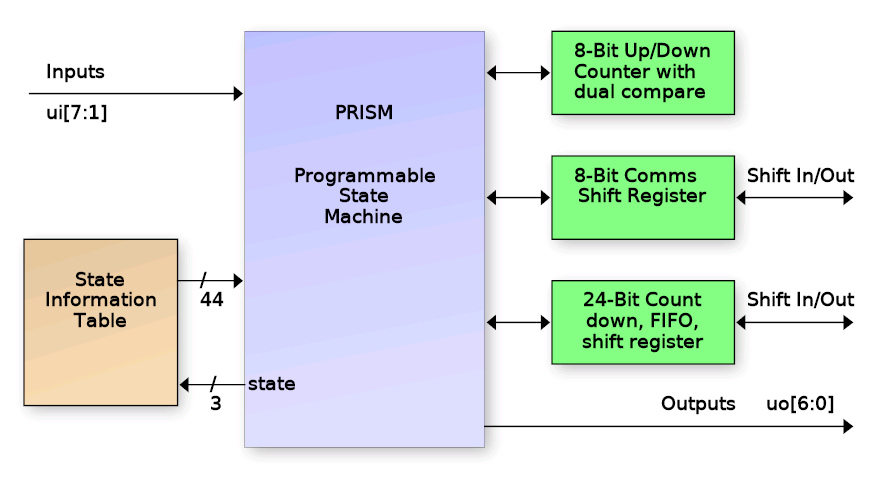
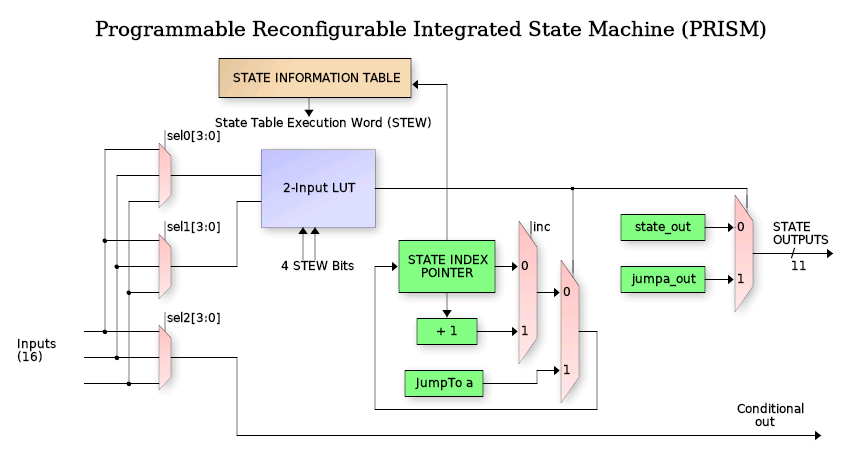
The PRISM controller block is a programmable state machine that uses an N-bit (3 in this case) index register to track the current FSM state. That index is a pointer into the State Information Table (SIT) to request the State Execution Word (STEW).
What can it do?
Operating priciples of PRISM
PRISM supports FSM designs up to 8 states and includes controllable peripherals such as counters, communication shift register, FIFO and interrupt support. It also features an integrated debugger with 2 breakpoints, single-stepping and readback of state information. Due to long combinatorial delays, PRISM operates from a divide-by-two clock (32Mhz max). The following is a block diagram of the PRISM controller:
Each state is encoded with a 44-bit (in the case of TinyQV PRISM) execution word that controls the FSM output values, input values and state transition decision tree for that state. The peripheral is operated by loading a "Chroma" (more on that below), or execution personality in the 352 bit configuration array and programming the 14-bit control word to set peripheral behaviors (like choosing 24-bit shift register vs. 24-bit counter, choosing pin locations for shift data in/out, etc.).
Once a chroma has been loaded, the control register programmed and the PRISM enabled, the FSM will start at state 0. Eight of the bits in the State Execution Word (STEW) specify which of 16 inputs get routed to the 2-input Look Up Table (LUT) that makes the decision for jumping to the specified state (stored in 3 bits of the STEW). While in any state, there is a set of 11 (from the STEW) output bits that drive the PRISM block outputs when the LUT output is zero (no jump) and 11 more that are output during a jump (transitional outputs).
Each state also has an independent 16-input mux (4-bits from STEW) driving a 1-input LUT to drive a "conditional output". This is an output who's value is not strictly depedent on the static values in the STEW for the current state, but rather depends on the selected input during that state.
State Looping (important)
In larger PRISM implementations, each state has "dual-compare" with two N-bit LUTs which allows jumping to one of two possible states. Due to size restrictions, this peripheral does not include dual-compare. Instead the PRISM implementation has (in each state's STEW), a single "increment state" bit.
In any state where the 'inc' bit is set and the LUT output is FALSE (i.e no jump), then the state will increment to the next state, and the "starting state" of the first occurance of this will be saved (i.e. start of loop). Then each successive state can test a different set of inputs to jump to different states. When a state is encountered with the 'inc' bit NOT set, PRISM will loop back to the "starting state" and loop through that set of states until the first TRUE from a LUT causing a jump, clearing the loop.
TL/DR
- Load a Chroma defining the FSM and enable PRISM.
- State starts at zero.
- Each state chooses up to 3 of 16 inputs via config bits.
- 2-input LUT decides if "jump to defined state" occurs.
- Increment bit decides if "state looping" is in effect.
- State looping ends when first LUT jump occurs.
- Outputs bits from STEW for "non-jump" and "transitional jump".
- One conditional output based on single selected input per state.
External PRISM Inputs
Inputs to the PRISM engine come from the ui_in[6:0] pins of the TinyTapeout ASIC (pin 7 is not used as this is a UART pin for TinyQV). All 7 ui_in[6:0] pins are directly selectable by the running chroma for state transition or conditional output decisions.
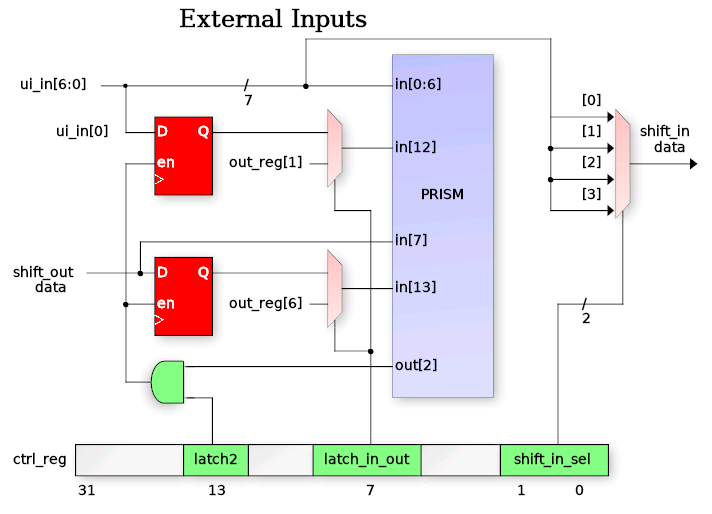
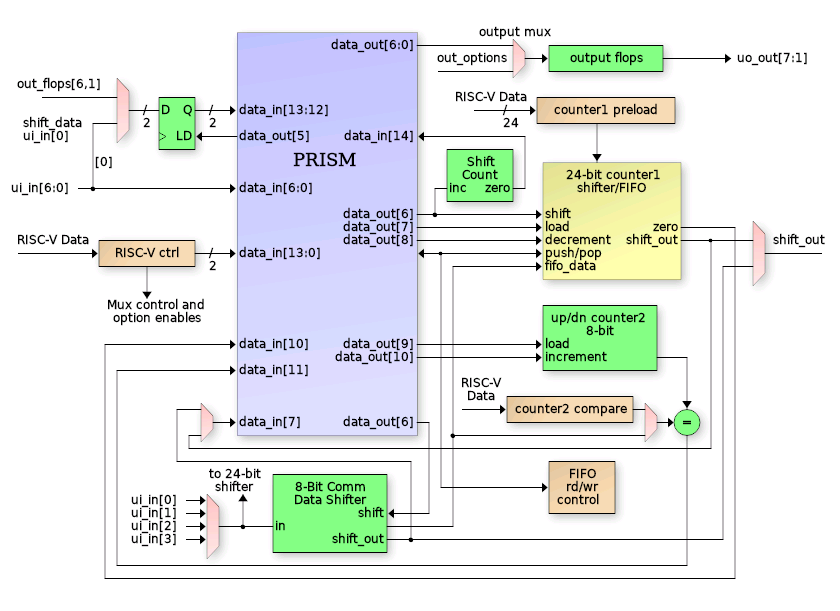
In addition to direct input to the PRISM, a few inputs also have special functions (refer to the diagram below for visual). Input ui_in[0] can be programmatically latched by the chroma using PRISM out[2] when configured via the ctrl_reg latch2 and latch_in_out bits. The latched input version becomes available on PRISM input in[12]. This allows for detection of rising or falling edges.
Additionally any one of inputs in[3:0] can be used as shift register "shift_in_data" to feed the 8-bit and 24-bit shift registers. Selection of which pin of in[3:0] is made using ctrl_reg field "shift_in_sel".
The diagram also shows that shift_out_data can be latched via the out[5] signal. It is to allow protocols like SPI to present serial output data on one edge while shifting occurs on the opposite edge (by selecting in[13] as the controlling input for the cond_out[0] conditional output.
The in[13:12] inputs to PRISM can also be driven by the registered version of out[6] and out[1] bits. This allows a chroma to use a single FSM state to perform multiple output operations using the in-state vs. transitional outputs. For instance, the shift_en signal is output on out[6]. The following code will perform a rising plus falling shift edge in a single FSM state since a registered version of the shift_en is used to detect when to transition to the next state.
STATE_SHIFT_BITS:
   begin
      // Shift the next bit out
      shift_en = 1'b1;

      // Detect the rising shift_en bit to go to next state
      if (shift_en_in)
      begin
         next_state = STATE_DELAY;
         shift_en = 1'b0;
      end
   end
External PRISM Outputs
The PRISM has 11 outputs, 7 of which (out[6:0]) can directly drive uo_out[7:1] pins. Note that uo_out[0] is not used since it is the TinyQV UART TX pin. However some of the out[6:0] outputs from PRISM also have special functions, and the uo_out[7:1] pins also have muxes allowing other types of output (such as shift_out data, conditional out, etc.). Below is a diagram of the external outputs for the PRISM peripheral.
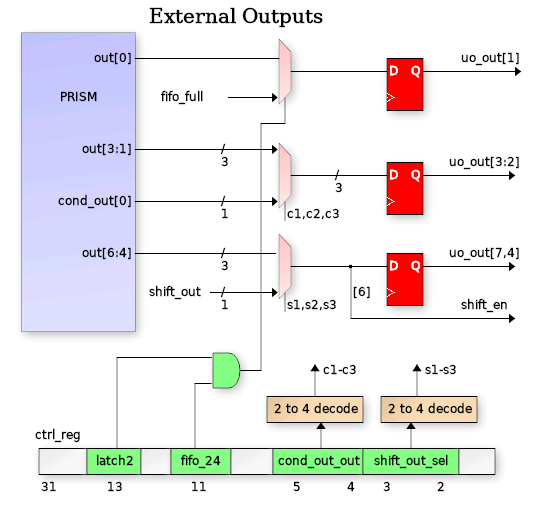
Outputs uo_out[1], out[5] and out[7] are controled directly by PRISM outputs 0,4 and 6 respectively. Though PRISM out[6] also serves as the "shift_enable" signal when performing either an 8-bit or 24-bit shift operation (via enable bits in the ctrl_reg).
Outputs uo_out[4:2] can be driven either directly from PRISM out[3:1], or can have muxed data:
- cond_out_sel (2-bits) when non-zero selects cond_out[0] conditional output.
Outputs uo_out[7:5] can be driven either directly from PRISM out[6:4], or can have muxed data:
- shift_out_sel (2-bits) when non-zero selects 8 or 24 bit shift out data.
Output uo_out[0] can be driven either directly from PRISM out[0] or can be the "fifo_full" signal when fifo_24 and latch2 config bits are set in ctrl_reg (more on those bits in the 3-Byte FIFO section).
Peripherals
The PRISM Peripheral has, itself, peripherals. Those are:
- 8-Bit communication shift register (left or right)
- 8-Bit count up/down register with compare (dedicated compare reg or comm register).
- 24-bit register: Count down with zero detect, shift left / right or 3-byte FIFO
- 5-bit Shift bit counter (automatic)
- Input shift data source selection
- Output shift data destination selection
- Conditional output destination selection
- Controllable latched inputs (2-bits)
8-Bit Counter (count2)
The 8-bit counter is an up/down/clear counter controllable from the PRISM chroma. There are three PRISM outputs plus a ctrl_reg bit that contols the operation (see figure below). Upon reset (or disabling PRISM) the count will be zero. In any PRISM state, the counter can be cleared, incremented or decremented (assuming decrement has been enabled via the count2_dec ctrl_reg bit). The decrement is provided as a configurable feature in case it is not needed but uo_out[6] is needed (since they share the same out[5] signal).
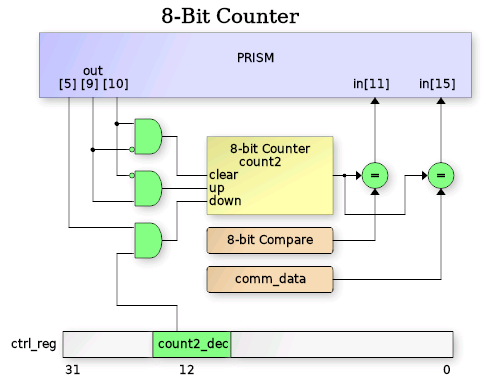
The current 8-bit count2 value is compared against both the 8-bit count2_compare register (fixed register accessible by TinyQV with R/W access) and the comm_data register (also R/W accessible). The result of each of these compares are made available on PRISM inputs in[11] and in[15]. A running chroma can use these compare inputs for timing, terminal count checking, etc.
Chroma
Chroma are PRISM's version of "personalities". Each chroma is a unique hue of PRISM's spectrum of behavior. Chroma's are coded as Mealy state machines in Verilog to define FSM inputs, outputs and state transitions:
always @(posedge clk or negedge rst_n)
   if (~rst_n)
      curr_state <= 3'h0;
   else
      curr_state <= fsm_enable ? next_state : 'h0;

always_comb
begin
   pin_out[5:0]   = 6'h0;
   count1_dec     = 1'b0;
   etc.

   case (curr_state)
   STATE_IDLE:       // State 0
      begin
         // Detect I/O shift start
         if (host_in[HOST_START])
         begin
            // Load inputs
            pin_out[GPIO_LOAD] = 1'b0;

            // Load 24-bit shift register from preload (our OUTPUTS)
            count1_load = 1'b1;
            next_state = STATE_LATCH_INPUTS;
         end
      end
   STATE_LATCH_INPUTS:  // State 1
      begin
         next_state = STATE_SHIFT_BITS;
      end
   etc.
end
Chroma are compiled into PRISM programmable bitstreams via a custom fork of Yosys (see link below) using a configuration file describing the architecture in the TinyQV PRISM peripheral. In addition to bitstream generation, the Yosys PRISM backend also calculates the ctrl_reg value for configuring the PRISM peripheral muxes, etc. There are several output formats including C, Python and columnar list:
| ST | Mux0 | Mux1 | Mux2 | Inc | JmpA | OutA | Out | CfgA | CfgB | STEW |
|---|---|---|---|---|---|---|---|---|---|---|
| 0 | 8 | 0 | 0 | 0 | 1 | 100 | 001 | a | 0 | 28800012010 |
| 1 | 0 | 0 | 0 | 0 | 2 | 001 | 000 | f | 0 | 3c008004000 |
| 2 | d | 0 | 0 | 0 | 3 | 001 | 041 | a | 0 | 2800841601a |
| 3 | e | 0 | 0 | 1 | 2 | 001 | 001 | 5 | 0 | 1400801401d |
| 4 | 0 | 0 | 9 | 0 | 5 | 001 | 000 | f | 2 | bc00800b200 |
| 5 | 8 | 0 | 0 | 0 | 0 | 001 | 001 | 5 | 0 | 14008010010 |
| 6 | 0 | 0 | 0 | 0 | 0 | 001 | 000 | f | 0 | 3c008000000 |
| 7 | 0 | 0 | 0 | 0 | 0 | 001 | 000 | f | 0 | 3c008000000 |
The table has the following fields
- ST: the state (obvious)
- Mux0: Selects input for LUT2 input 0 (jump decision)
- Mux1: Selects input for LUT2 input 1
- Mux2: Selects input for LUT1 Conditional Output
- Inc: Set when next state looping is requested (i.e. 'else state <= ST_A')
- JmpA: The "Jump to" state if LUT2 output is TRUE
- OutA: Outputs during "jump to" JmpA state (LSB is PRISM out[0])
- Out: Output during no-jump, steady-state dwelling
- CfgA: The LUT2 4-bit lookup table values
- CfgB: The LUT1 2-bit lookup table values
- STEW: The complete word aggregrated in proper bit order
Register map
Document the registers that are used to interact with your peripheral
| Address | Name | Access | Description |
|---|---|---|---|
| 0x00 | CTRL | R/W | Control register - see [CTRL Register] below |
| 0x04 | DBG_CTRL | W | Debug control |
| 0x0C | DBG_STAT | W | Debug status |
| 0x10 | CFG_LSB | W | Config LSB (write second) |
| 0x14 | CFG_MSB | W | Config MSB (write first) |
| 0x18 | HOST_DATA | R/W | Host data - see [HOST_DATA Register] |
| 0x19 | FIFO_DATA | R | FIFO read data - see [HOST_DATA Register] |
| 0x1A | FIFO_STAT | R | FIFO status - see [HOST_DATA Register] |
| 0x1B | HOST_IN | R/W | Host input - see [HOST_DATA Register] |
| 0x20 | COUNT_CFG | R/W | Counter config - see [COUNT_CFG Reg] |
| 0x24 | COUNT_VAL | R | Counter values - see [COUNT_VAL Reg] |
| 0x34 | DECISION_TREE | R | Decision tree data |
| 0x38 | OUTPUT_DATA | R | Output data |
| 0x3C | INPUT_DATA | R | Input data |
Bit-field Details
CTRL Register (0x00)
| Bit(s) | Name | Description |
|---|---|---|
| 31 | Interrupt clear | Write 1 to clear interrupt |
| 30 | PRISM enable | Enable/disable PRISM executino |
| 23 | ui_in[7] | Direct read of ui_in bit 7 |
| 22-16 | latched_out | Latched output values |
| 13 | latch5 | Use prism_out[5] to latch inputs |
| 12 | count2_dec | Enable count2 decrement mode |
| 11 | fifo_24 | Enable 24-bit FIFO mode |
| 10 | shift_24_en | Enable 24-bit shift mode |
| 9 | shift_dir | Shift direction (0=left, 1=right) |
| 8 | shift_en | Enable shift operations |
| 7 | latch_in_out | Latch input/output mode |
| 6-4 | cond_out_sel | Conditional output selection |
| 3-2 | shift_out_sel | Shift output selection |
| 1-0 | comm_in_sel | Communication input selection |
DBG_CTRL Register (0x04)
| Bit(s) | Name | Description |
|---|---|---|
| 13-11 | new_si_val | New state index to set |
| 10 | new_si | Set to 1 to set new state index |
| 9-7 | bp1 | Breakpoint 1 state index |
| 6-4 | bp0 | Breakpoint 0 state index |
| 3 | bp1_en | Enable breakpoint 1 |
| 2 | bp0_en | Enable breakpoint 0 |
| 1 | single_step | Toggle 1->0 to single step PRISM |
| 0 | halt_req | Set to 1 to halt the PRISM |
DBG_STAT Register (0x0C)
| Bit(s) | Name | Description |
|---|---|---|
| 8-7 | break_active | Which breakpoint is active |
| 6 | debug_halt | Indicates if PRISM is halted |
| 5-3 | next_si | Next state index to jump to |
| 2-0 | curr_si | Current state index |
HOST_DATA Register (0x18)
| Bit(s) | Name | Description |
|---|---|---|
| 31-26 | Reserved | Reserved bits |
| 25-24 | host_in | Host input data |
| 23-21 | Reserved | Reserved bits |
| 20-19 | fifo_rd_ptr | Reserved bits |
| 19-18 | fifo_wr_ptr | Reserved bits |
| 17 | fifo_full | FIFO full status |
| 16 | fifo_empty | FIFO empty status |
| 15-8 | fifo_rd_data | FIFO read data |
| 7-0 | comm_data | Communication data |
FIFO_READ Register (0x19)
Byte-mode access of the 3-byte RX FIFO. A byte read from this address will "pop" the byte from the fifo, incrementing the read point, updating the FULL / EMPTY flags, etc.
FIFO_STATUS Register (0x1a)
Byte-mode access of the RX FIFO status.
| Bit(s) | Name | Description |
|---|---|---|
| 31-26 | Reserved | Reserved bits |
COUNT_CONFIG Register (0x20)
| Bit(s) | Name | Description |
|---|---|---|
| 31-24 | count2_compare | 8-bit Compare value |
| 23-0 | count1_preload | 24-bit Preload value |
COUNT_VALUES Register (0x24)
| Bit(s) | Name | Description |
|---|---|---|
| 31-24 | count2 | Current value of 8-bit counter |
| 23-0 | count1 | Current value of 24-bit counter |
DEBUG_OUT Register (0x30)
| Bit(s) | Name | Description |
|---|---|---|
| 31-0 | debug_output | Debug output bits |
DECISION_TREE Debug Register (0x34)
| Bit(s) | Name | Description |
|---|---|---|
| 31-0 | decision_tree | Compare matches and LUT inputs |
OUTPUT_DATA Debug Register (0x38)
| Bit(s) | Name | Description |
|---|---|---|
| 31-11 | Reserved | Reserved bits |
| 10-0 | out_data | Current state output data |
INPUT_DATA Debug Register (0x3C)
| Bit(s) | Name | Description |
|---|---|---|
| 31-16 | Reserved | Reserved bits |
| 15-0 | in_data | Current input data |
How to test
- First define a Chroma FSM transitions, inputs and outputs.
- Write Verilog to describe your FSM in Mealy format.
- Specify the Control Word Mux and options bit settings in the Verilog: shift_en: Enable shifter mode in either comm_data or 24-bit count1 shift_24_en: Specify if shift is comm_data or count1 shift_dir: Set left or right shift direction fifo_24: Use 24-bit count1 as RX FIFO etc.
- Clone and build the custom Yosys fork for generating PRISM bitstreams. (2)
- Generate your chroma bitstream using the PRISM Yosys version. (3)
- Copy the generated chroma and ctrl_reg value from either the .py or .c file.
- Pass the chroma and ctrl_reg value to the "load_chroma" function.
- The chroma should start running immediately.
(1) See examples in chromas directory. (2) The Makefile in the chromas directory has a 'make yosys' target for cloning and building this from github sources. (3) If you put your chroma in the 'chromas' directory and follow the naming convention, simply typing 'make' within that directory will build your chroma. Results appear in the 'output' directory.
- https://github.com/kdp1965/tinyqv-prism-lite/tree/main/chromas
- https://github.com/kdp1965/yosys-prism
External hardware
No external HW required other than anything custom you might want to control from the programmable FSM.
IO
| # | Input | Output | Bidirectional |
|---|---|---|---|
| 0 | UART RX | fsm_out0 | |
| 1 | fsm_in0 | fsm_out1 | |
| 2 | fsm_in1 | fsm_out2 | |
| 3 | fsm_in2 | fsm_out3 | spi_miso |
| 4 | fsm_in3 | fsm_out4 | spi_cs_n |
| 5 | fsm_in4 | fsm_out5 | spi_clk |
| 6 | fsm_in5 | fsm_out6 | spi_mosi |
| 7 | fsm_in6 | UART TX |