Flashing the Gamepad PMOD
Clone controllers may report incorrect values when the PMOD attempts to read from it, rendering them unusable. This issue can be fixed with a simple firmware reflash of the PMOD.
Steps
-
Clone the
gamepad-updaterepo.git clone https://github.com/psychogenic/gamepad-update
-
Navigate into the repo and initialise the submodules.
git submodule update --init
-
Patch
src/pico_ch32v003_prog/flash_ch32v003.pywith the following diff:
diff --git a/flash_ch32v003.py b/flash_ch32v003.py
index 7575c54..6a0c5c0 100644
--- a/flash_ch32v003.py
+++ b/flash_ch32v003.py
@@ -275,7 +275,7 @@ class CH32_Flash():
         flash_start_time = time.ticks_us()
         self.unlock_flash()
         self.erase_chip()
-        fhandle = open(filename, "b")
+        fhandle = open(filename, "rb")

         datalen = 0
         data = fhandle.read(64)
-
Download the updated firmware and place it into the
srcfolder of thegamepad-updaterepo -
Download the micropython script which will flash the firmware onto the PMOD (or copy-paste the following codeblock into )
-
Download the micropython script which will flash the firmware onto the PMOD and place it into
src/(or copy-paste the following codeblock into a file calledgamepad_prog.py)
'''

Replacement main to run gamepad sop

@author: Pat Deegan
@copyright: Copyright (C) 2024 Pat Deegan, https://psychogenic.com
'''

GamepadFirmwareFile = '/remote/ch32gamepad.bin'
SkipBurn = False

import utime
import gc
import micropython
from gamepad_mem import flush_mem
print("BOOT: Tiny Tapeout Gamepad Burner")

flush_mem('prior to imports')
# import ttboard.util.colors as colors
# import ttboard.log as logging

flush_mem('before bnt')
import gamepad_bnt as gpad

flush_mem('before db')
from gamepad_db import BareDemoboard

flush_mem('before db ctor')
Demoboard = BareDemoboard()
# colors.color_start('magenta', False)

def mainloop():
    global Demoboard
    while True:
        print("\n\n")
        print(f"The gamepad burn/test start.")
        print("Connect PMOD to INPUT port.")
        print("\n")
        if gpad.burn_and_test_loop(Demoboard, fw_file=GamepadFirmwareFile, skip_burn=SkipBurn):
            print("SUCCESS! :-)\n\n")
        else:
            print("  There was an issue with this board... ")
            print("  Press CLOCK or RESET to proceed.")
            gpad.wait_for_go(Demoboard)

mainloop()

if __name__ == "__main__":
    main()
- Prepare your gamepad PMOD for programming by connecting
PRJandSWIOpins together with a jumper.
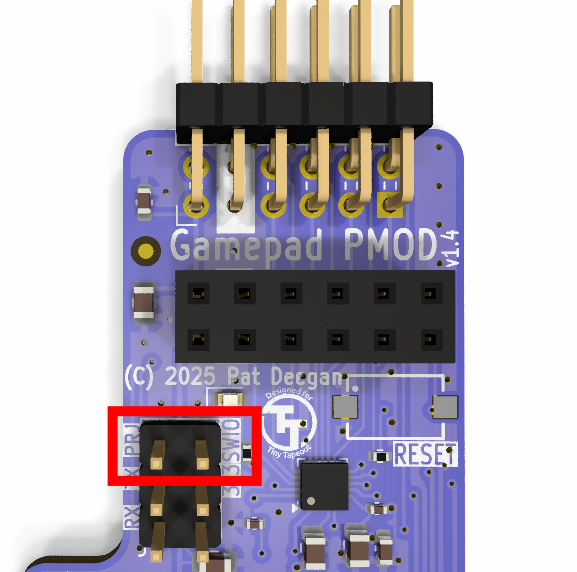
PRJ and SWIO must be connected together with a jumper to enable programming mode.
-
Connect your gamepad PMOD to your demoboard.
-
Connect your demoboard to your PC.
-
From the
src/directory of thegamepad-updaterepo, dompremote mount . + run gamepad_prog.py.
If successful, your gamepad PMOD should now work nicely with clone controllers!